Prompt Engineering, Flow Integration, and Content Orchestration.
The Goal: Moving beyond the "Chatbox" to a structured AI utility. In this series, I document the technical orchestration required to turn Large Language Models into reliable UX components. Using Salesforce Prompt Builder and Flow, I’ve shifted the focus from random AI outputs to grounded, predictable, and context-aware systems that reduce user cognitive load and eliminate information fragmentation.
Tools used: Salesforce Prompt Builder, Flow Builder, Einstein AI, Data Cloud, GPT-4o Mini.
Case Study 1: Orchestrating Predictable Content (Prompt Builder)
The Summary: How do we stop AI from guessing? Simply by grounding it. In this study, I created a Field Generation template that uses real-time CRM data to turn complex case histories into 100-word "Quick Summaries." This reduces Search Fatigue for support agents by putting the most important context exactly where they need it.
The Challenge.
Customer/Client support agents at Coral Cloud were suffering from "Context Overload." When opening a new case, they had to manually parse through long threads of comments, subject lines, and metadata to understand the issue. This manual synthesis increased the "Time to Resolution" and created a fragmented user experience. The goal was to build a system that auto-summarizes complex case data into a single, high-utility paragraph without losing factual accuracy.
The Solution: Grounded Field Generation
I implemented a Field Generation Prompt Template that transforms raw CRM data into a concise "Quick Summary." By moving away from generic AI "chats" and toward structured Prompt Engineering, I created a repeatable, scalable way for agents to get up to speed in seconds.
1. Environmental Readiness & Infrastructure
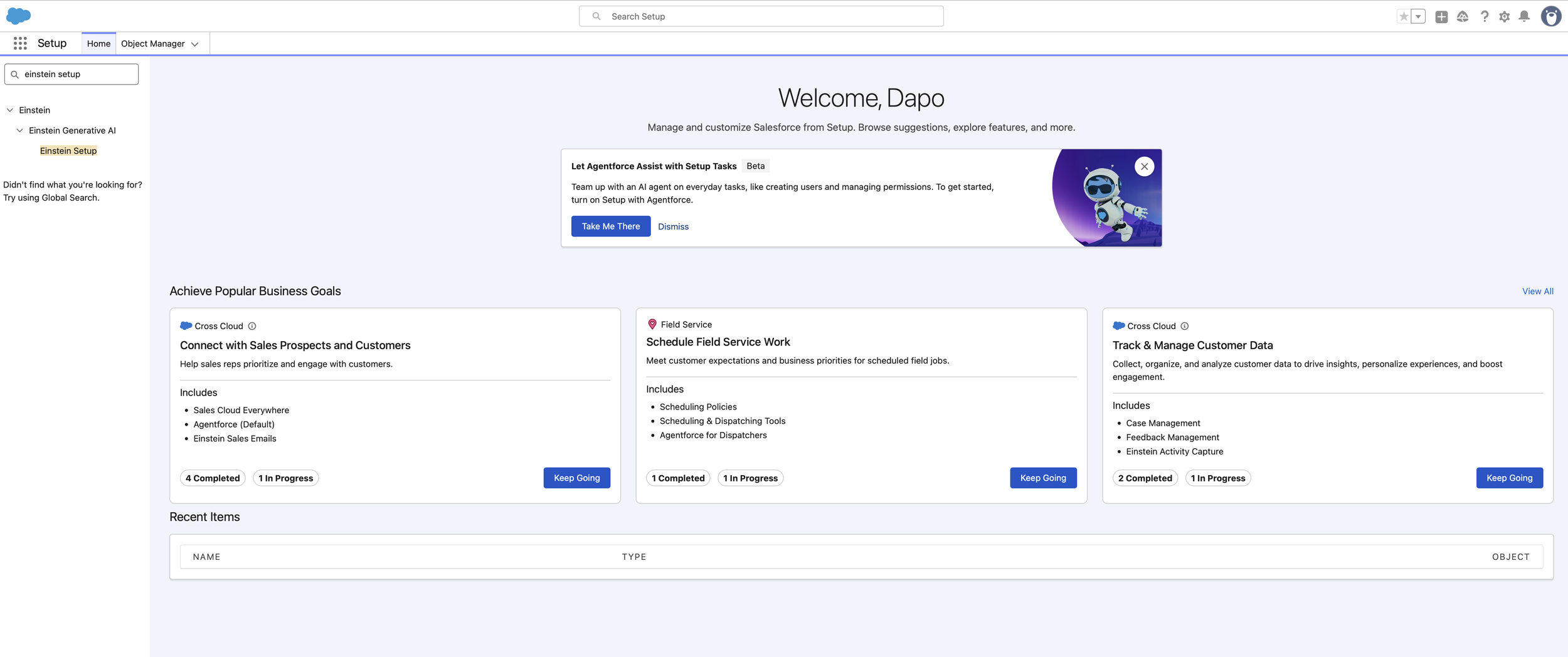
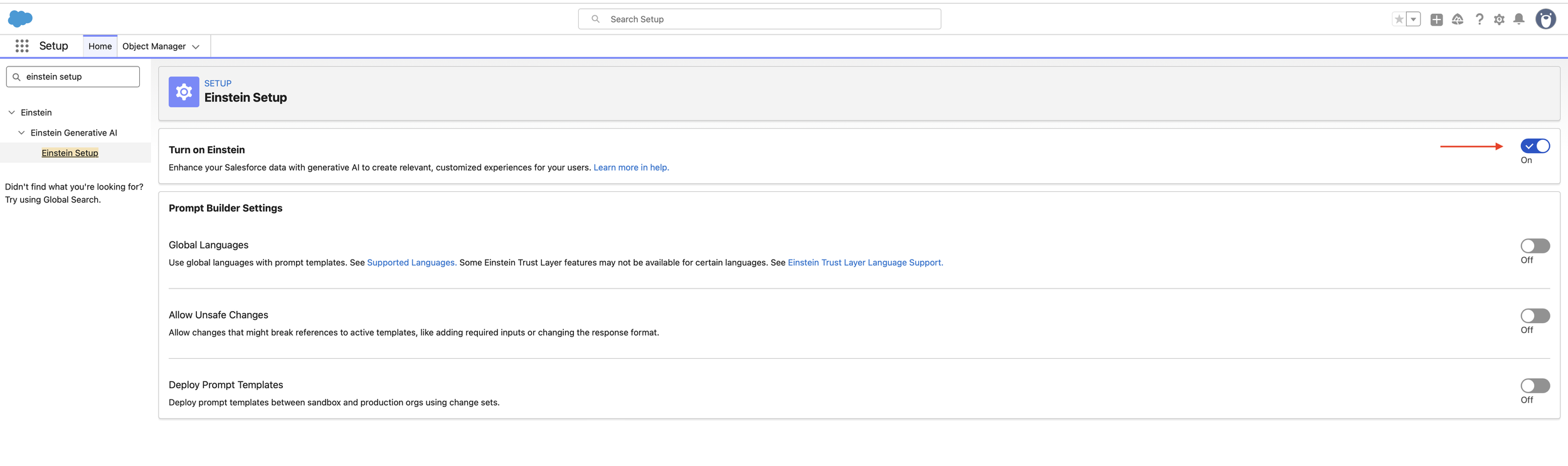
Before designing the logic, I ensured the generative ecosystem was active. This involved enabling the Einstein Generative AI layers within the platform to allow the LLM to communicate securely with our proprietary data.
UX Impact: By integrating AI directly into the record page, we reduce "App Switching," keeping the user focused on the case rather than jumping between tabs for summaries.
2. Dynamic Grounding & Resource Mapping
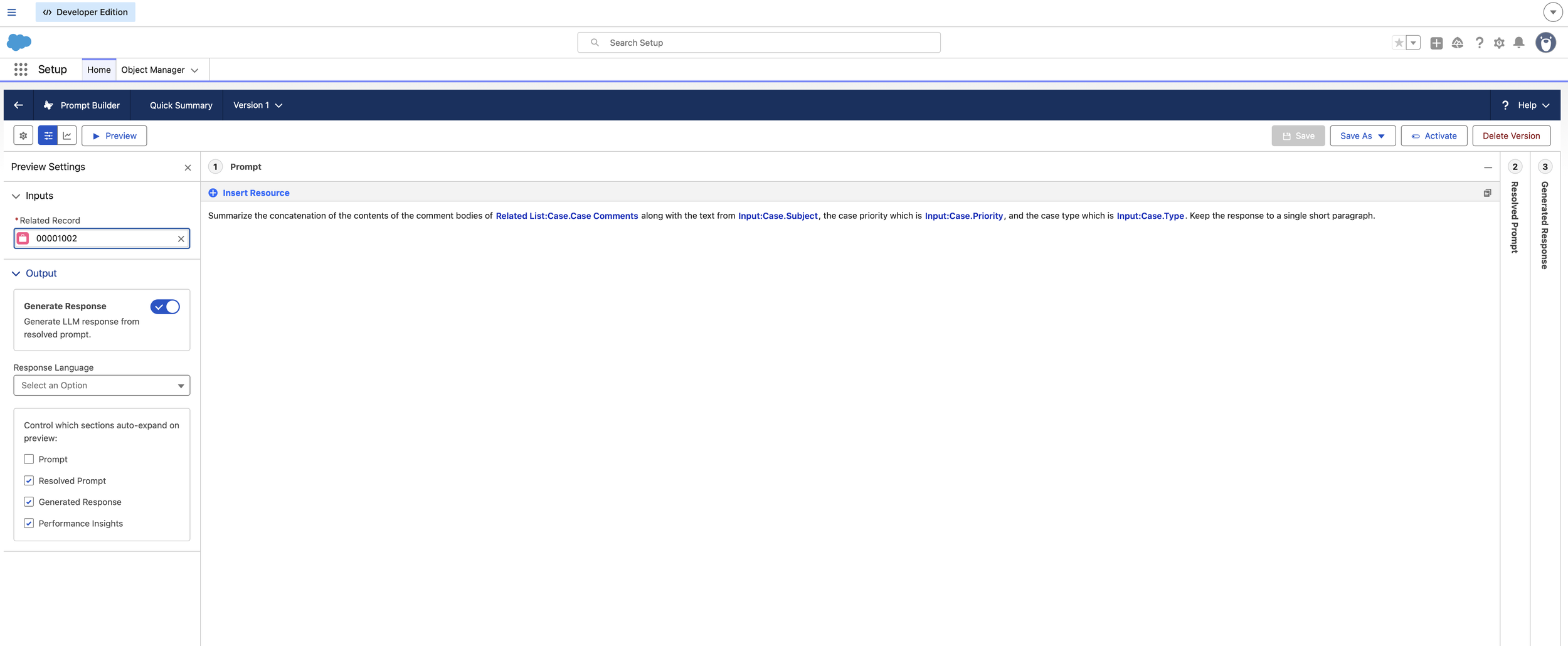
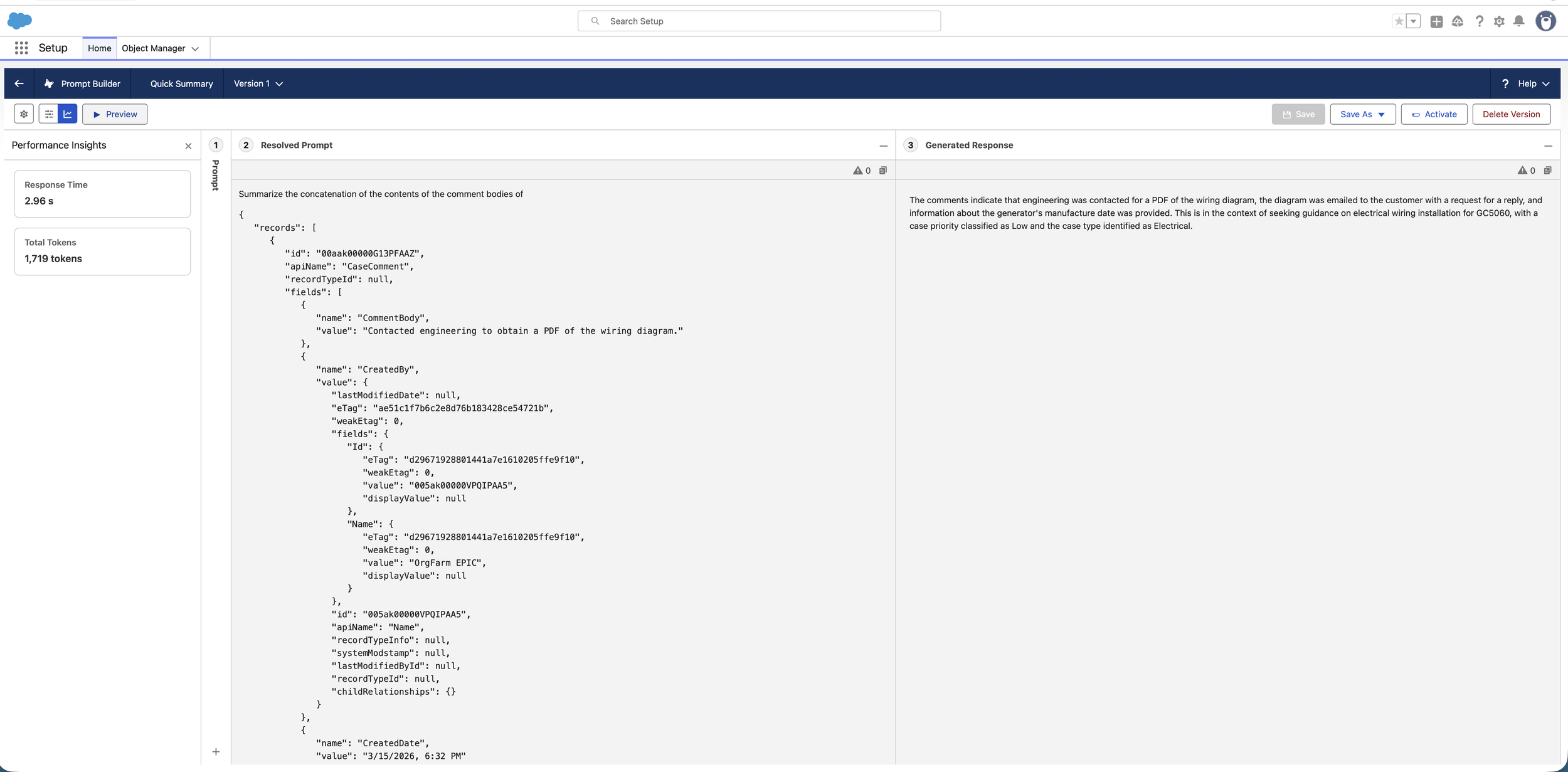
A summary is only useful if it’s accurate. I replaced static placeholders with Dynamic Merge Fields. I mapped the prompt to pull specifically from Case.CaseComments, Case.Subject, and Case.Priority.
The Logic: Instead of asking the AI to "summarize this case," I instructed it to "summarize the concatenation of these specific data points." This is Grounding; it ensures the LLM only uses the facts present in the record.
3. Deterministic Governance (The Guardrails)
To maintain "Predictable Design," I selected GPT-4o Mini and applied strict instructional guardrails. I constrained the output to a "single short paragraph" to prevent the AI from becoming too verbose, which preserves the user's cognitive load.
UX Value: Providing a consistent format (one paragraph) helps users build a Mental Model where they know exactly where to look for information every time they open a case.
4. Interface Integration (Dynamic Forms)
The final step was bringing the AI to the user’s fingertips. I upgraded the Case Record page to Dynamic Forms and associated the "Quick Summary" field with the new prompt template. This added the "Einstein Sparkle" icon to the field, signaling to the user that AI assistance is available.
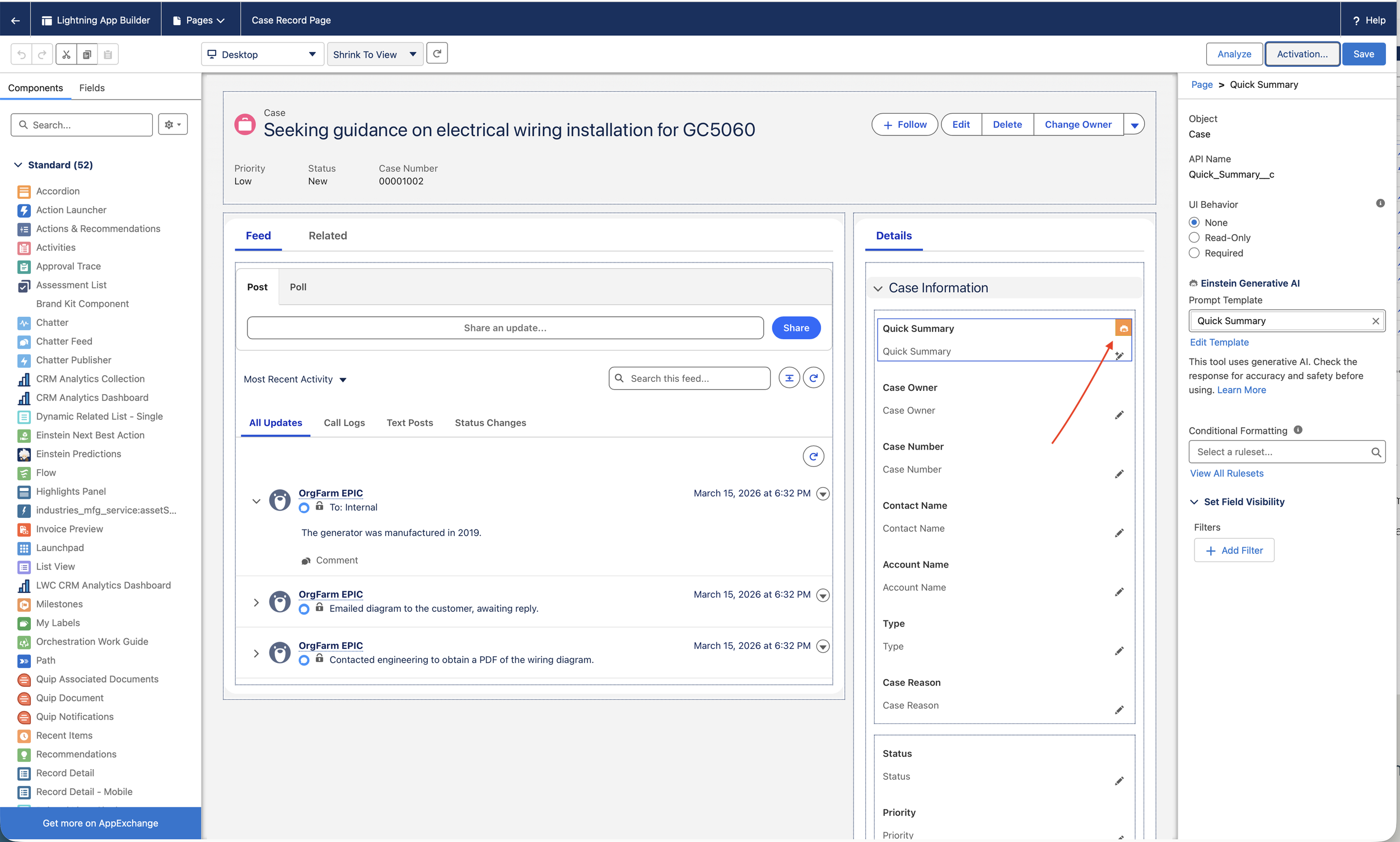
Key Results & Impact
Efficiency Gain: Agents can synthesize case history in ~5 seconds vs. 2–3 minutes of manual reading.
Zero-Friction UI: The summary is generated directly within the Quick Summary field, maintaining a seamless workflow.
High Fidelity: By grounding the prompt in CaseComments, the summary stays 100% factual, eliminating the risk of creative "hallucinations."
Case Study 2: Designing Context-Aware Newsletters with Flex Templates.
The Challenge.
Personalization in the hospitality industry often suffers from a "Data Silo" problem. At Coral Cloud Resorts, guest reservation data and on-site experience schedules lived in separate objects. Static email templates couldn't bridge this gap effectively, resulting in generic communications. The UX goal was to create a Flex Prompt Template, a versatile, "entry-point free" AI asset, that could synthesize data from multiple sources (Reservations + Experiences) into a cohesive, branded guest newsletter.
The Solution: The "Director of Fun" Persona
I designed a Flex Template that acts as a central intelligence hub. Unlike field-specific AI, this template is portable across Apex, Flows, or Agentforce, allowing for a truly Omnichannel UX where the same high-quality, personalized voice is available across all guest touchpoints.
Phase 1. Cross-Object Resource Mapping
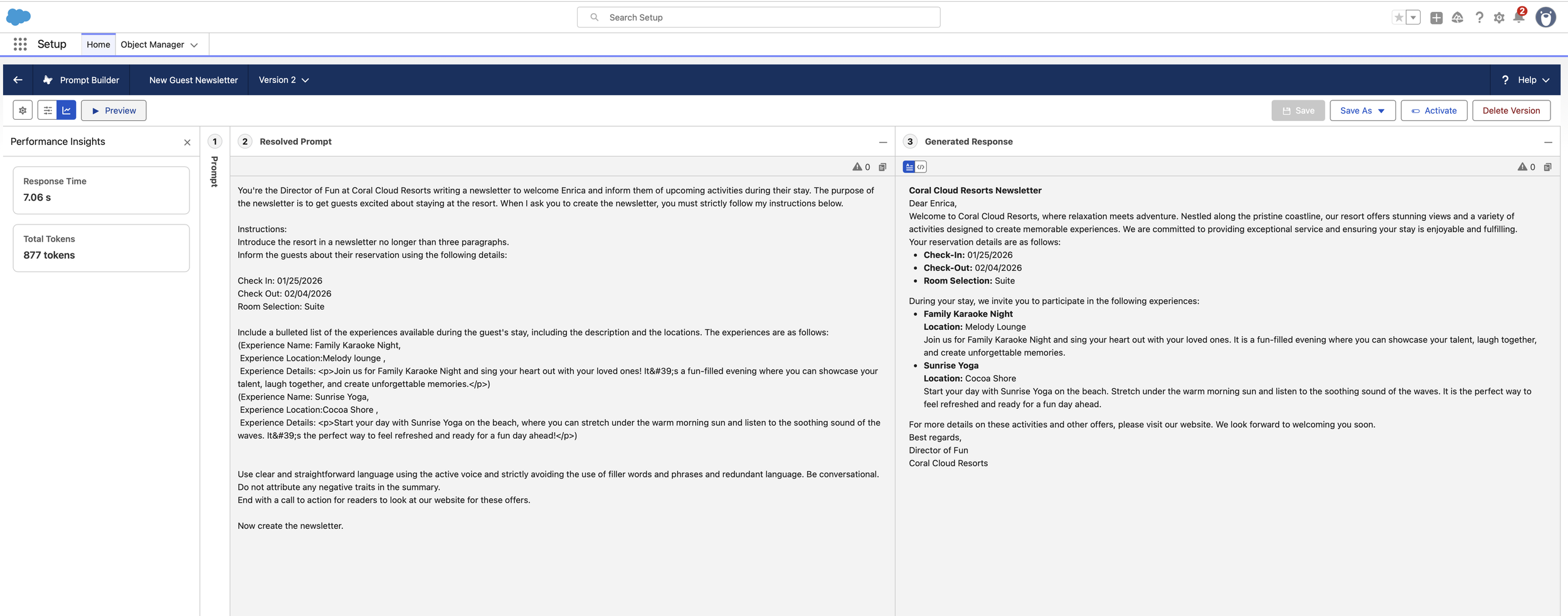
To build a complete guest mental model, the AI needed access to more than one data stream. I configured the template with Dual Inputs: the External Reservation object (for stay dates and room types) and the Experience object (for activity details).
UX Impact: By mapping disparate data points into a single prompt, we eliminate "Information Fragmentation," ensuring the guest receives a holistic view of their vacation in one interaction.
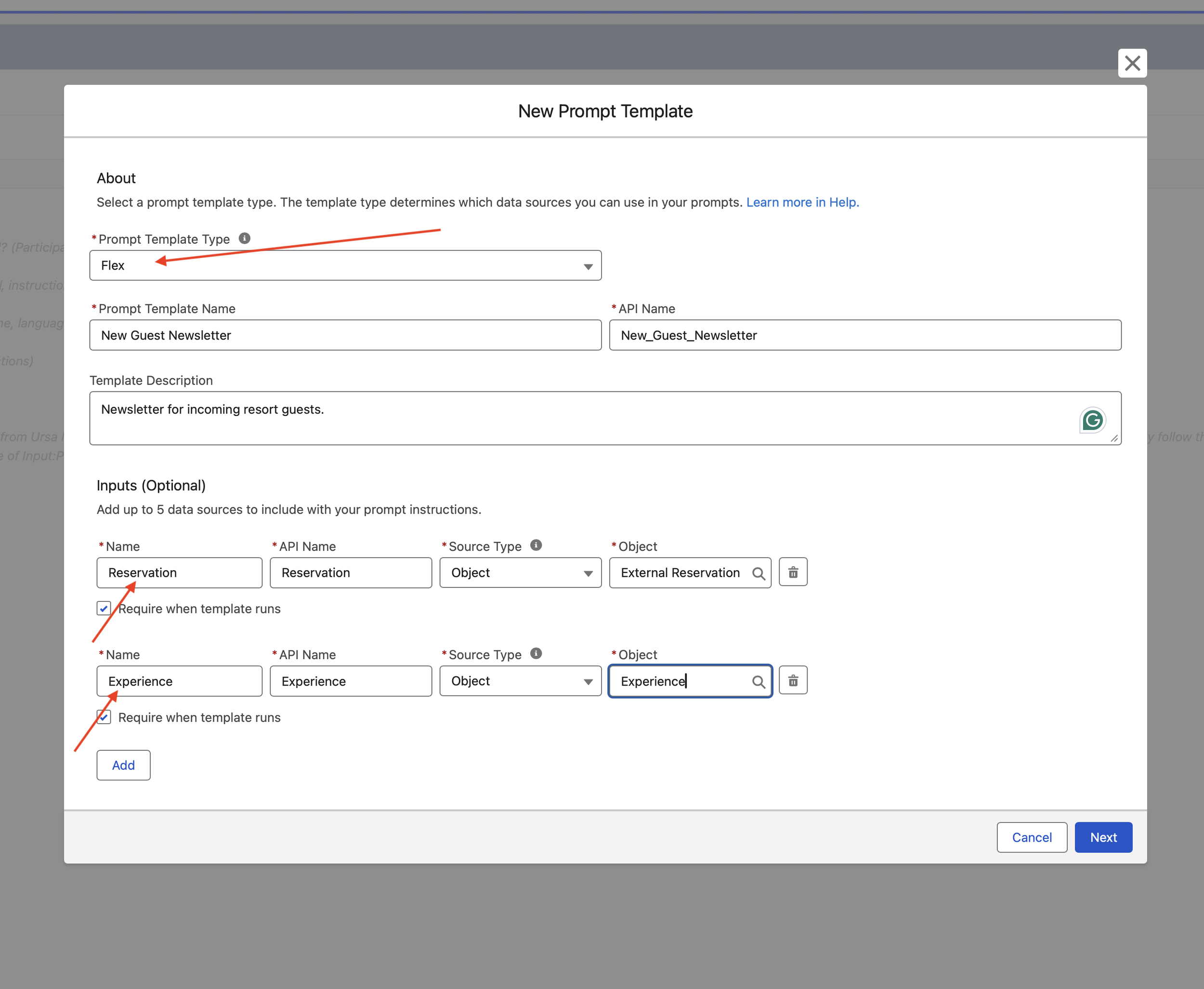
Phase 2. Persona-Driven Prompt Engineering
I established a specific Brand Voice by assigning the AI the role of "Director of Fun." I moved away from "LLM-speak" by implementing strict stylistic guardrails: active voice, no filler words, and a three-paragraph limit.
The Logic: By defining the persona before the task, the output shifts from a cold data summary to a conversational, welcoming experience that builds brand affinity.
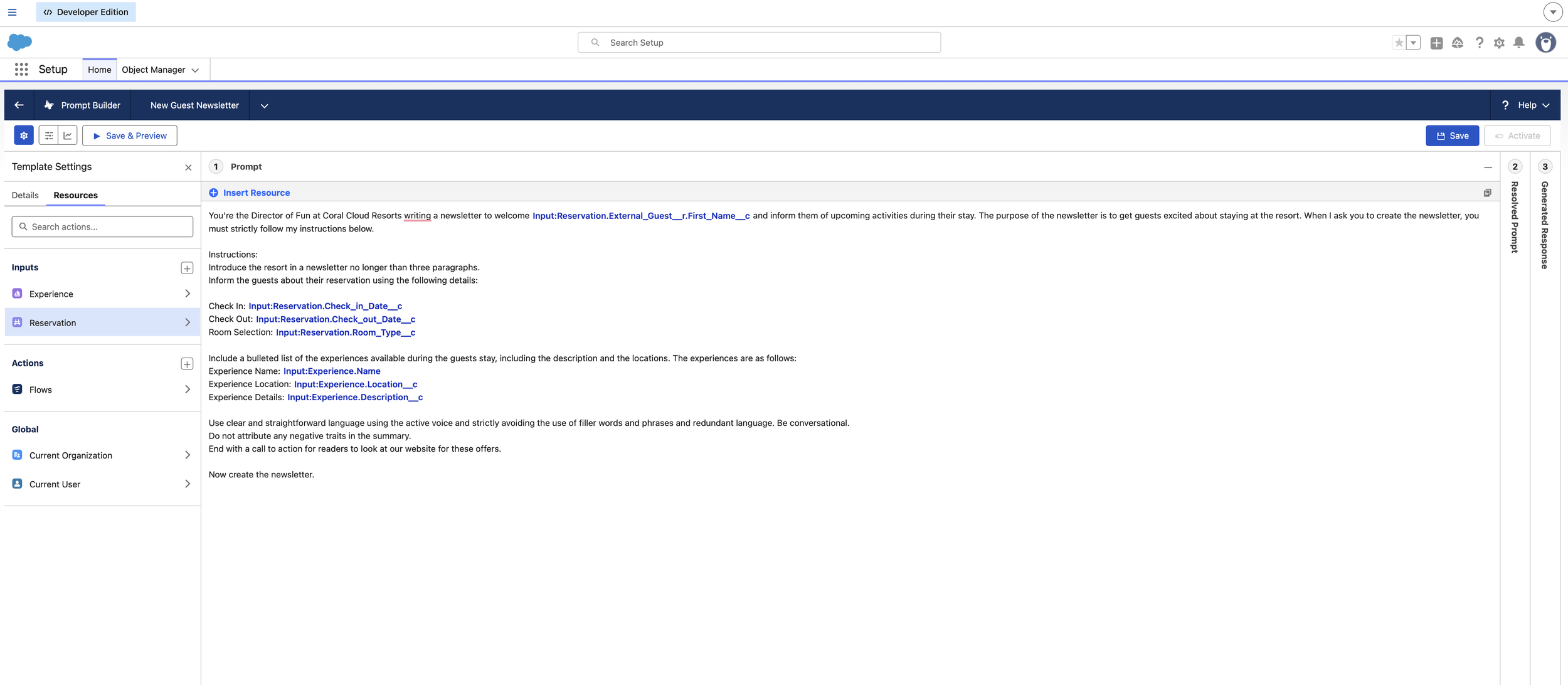
Phase 3. Proactive Discovery (Experience Integration)
To drive guest engagement, I designed a structured "Experience" section. The prompt was engineered to transform technical record data into a bulleted list of activities, effectively acting as a Conversational Discovery tool.
· UX Value: This reduces the "Search Effort" for the guest. Instead of looking for a resort map or schedule, the most relevant activities (like Sunrise Yoga or Family Karaoke) are served directly to them based on their reservation context.
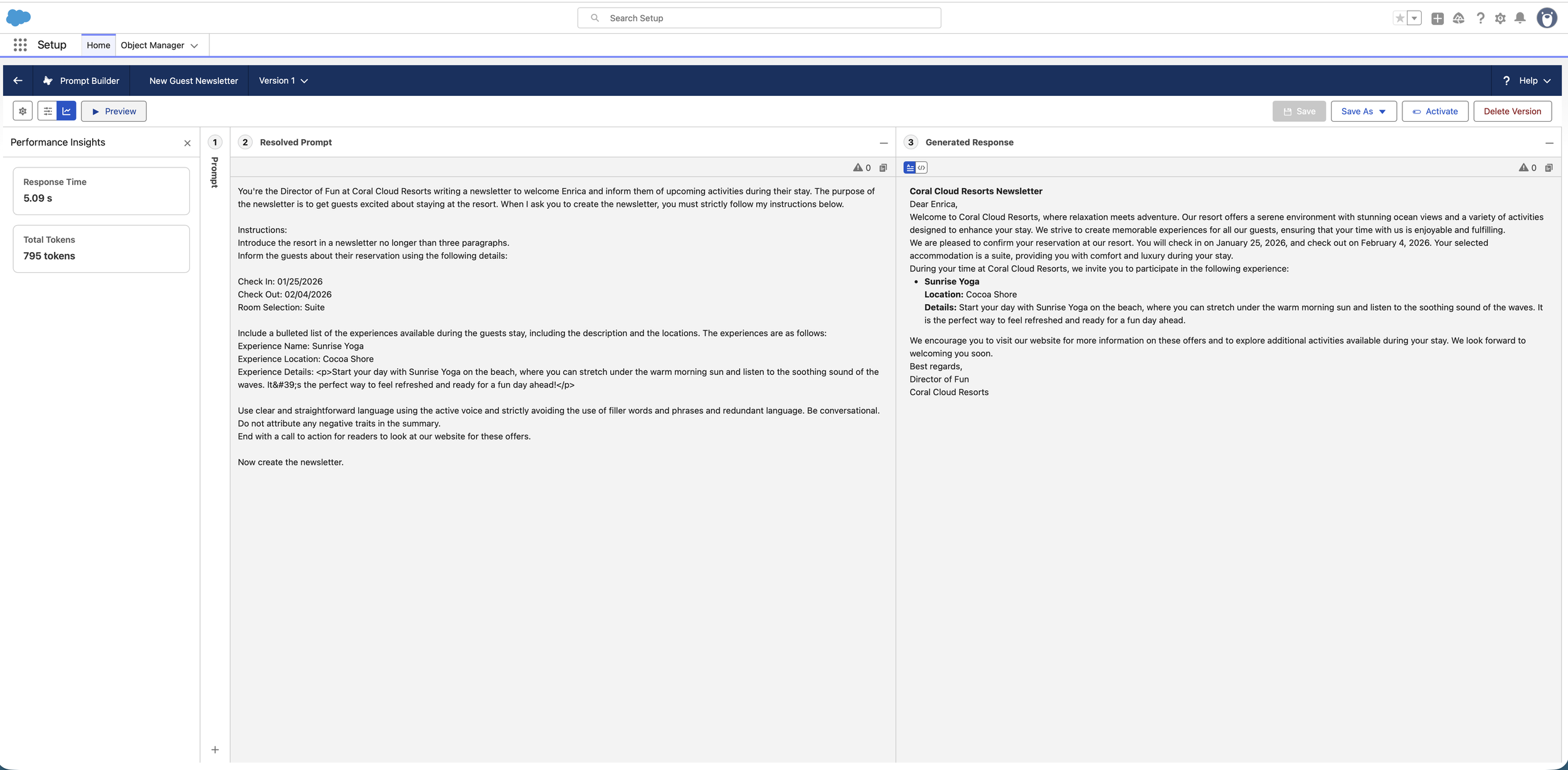
Phase 4. System Scalability & Flow Readiness
Recognizing that a guest's stay involves more than one activity, I built this template to be Flow-Compatible. This architectural choice allows the system to scale from a single-activity preview to a multi-day itinerary by injecting collections of data via a Template-Triggered Prompt Flow.
Key Results & Impact
Cohesive Brand Voice: Achieved a consistent, "Director of Fun" persona across automated communications.
Reduced Interaction Cost: Combined check-in details and activity discovery into a single "Zero-Click" personalized newsletter.
Modular Design: The Flex architecture allows this same logic to be reused in the mobile app, guest portal, or via automated email triggers without rebuilding the prompt.
Case Study 3: Scaling AI Intelligence with Template-Triggered Flows
The Challenge.
A single data point is rarely enough to tell a complete story. In the previous iteration of the Coral Cloud newsletter, the AI could only "see" one resort experience at a time. In a real-world UX scenario, a guest stays for multiple days and needs a full itinerary. The challenge was a technical bottleneck: how to inject an entire collection of dynamic records (all available events) into a single AI prompt without manual data entry.
The Solution: The "Prompt-Flow" Bridge
I engineered a Template-Triggered Prompt Flow to act as the "data harvester" for the AI. By using a programmatic loop, I transformed the LLM from a simple record-summarizer into a sophisticated itinerary orchestrator capable of processing large datasets.
1. Automated Data Retrieval (The "Get Records" Logic)
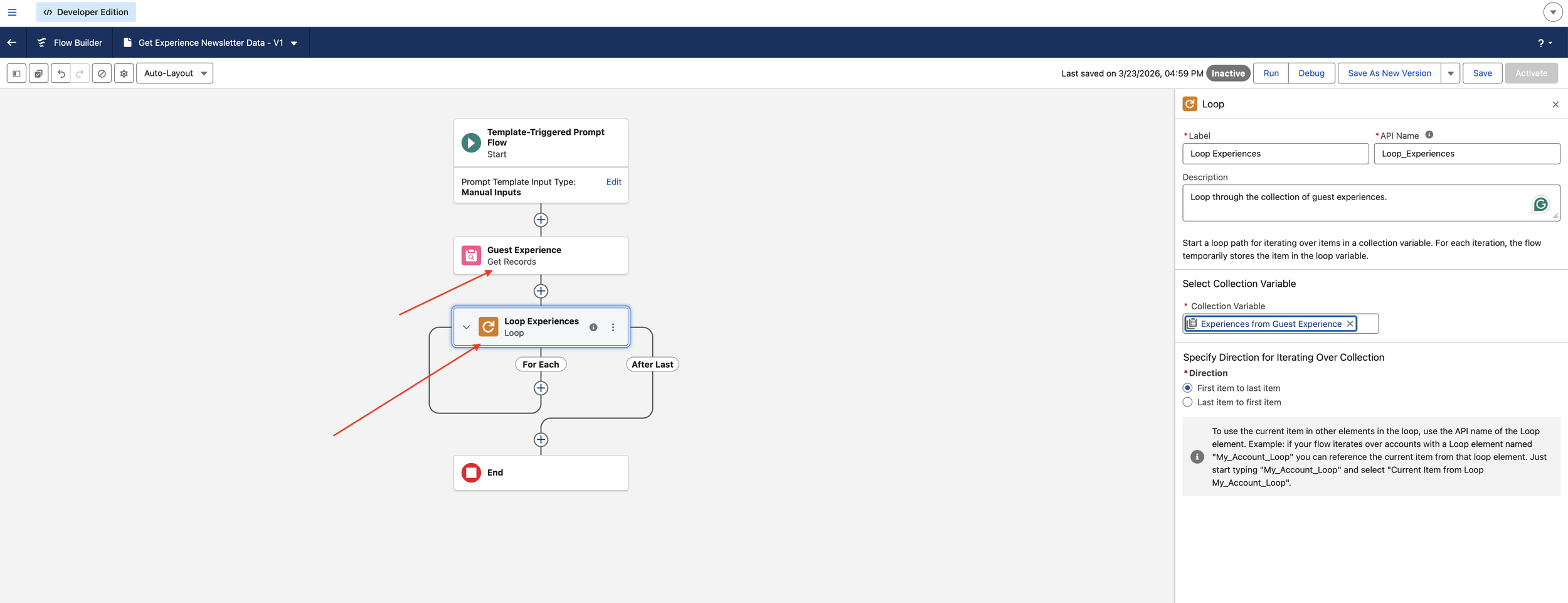
I replaced manual resource selection with an automated Get Records element. This background process queries the Experience object to retrieve all active resort events simultaneously.
UX Impact: This moves the system from "Reactive" (waiting for a user to pick an event) to "Proactive" (automatically finding all relevant events), significantly reducing the Interaction Cost for the internal team.
2. Pattern Recognition via Looping
To ensure the LLM receives clean, structured data, I implemented a Loop Element. This iterates through the collection of guest experiences, ensuring each Name, Location, and Description is captured.
· Systems Thinking: Instead of sending a messy "data dump" to the AI, the loop organizes the information into a predictable pattern, which allows the LLM to maintain higher Output Integrity.
3. Defining "Prompt Instructions" (The Connector)
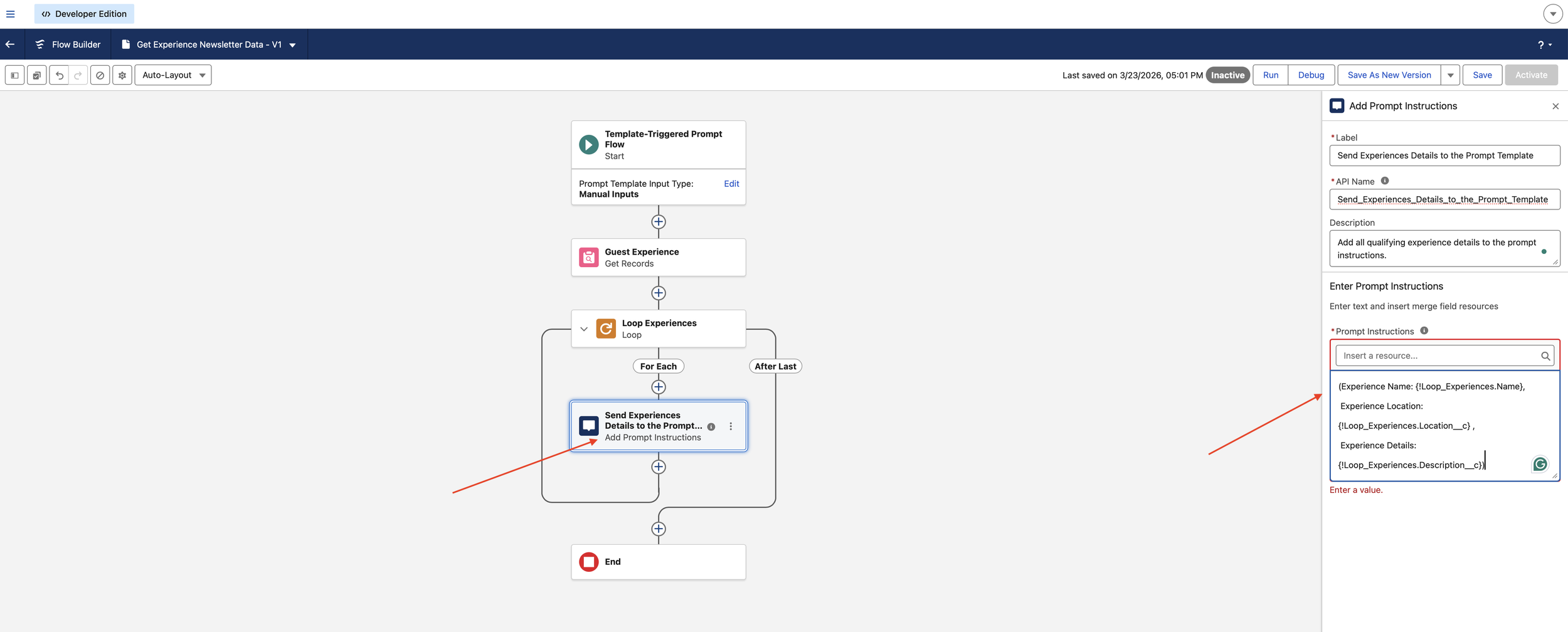
Within the loop, I used the Add Prompt Instructions element. This is a specialised UX-to-Logic connector that "feeds" the formatted text back to Prompt Builder.
The Logic: (Experience Name: {!Loop_Experiences.Name}, Location: {!Loop_Experiences.Location__c}...). This ensures the AI understands exactly where one event ends and the next begins.
4. Closing the Loop: Template Integration
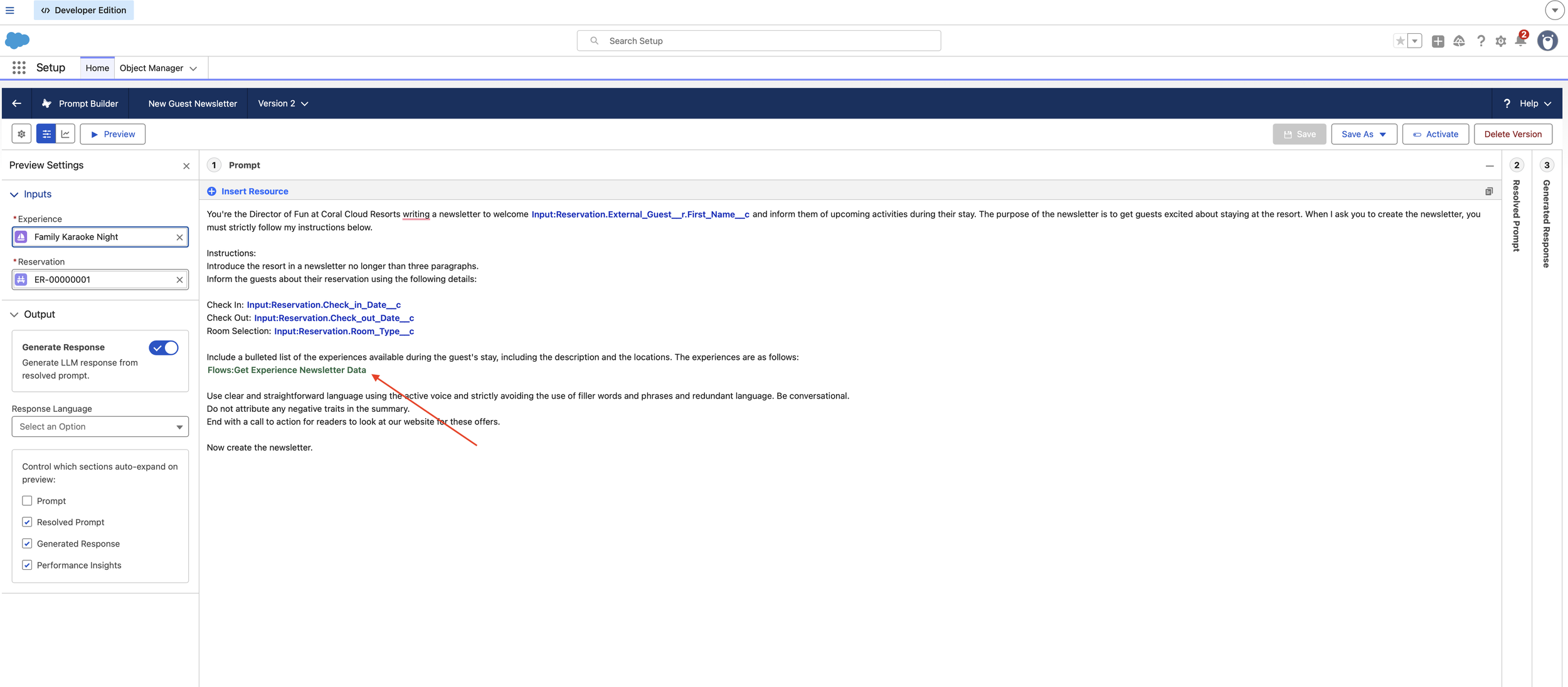
I returned to the Prompt Builder and swapped the static single-record fields for the new Flow Resource. This single change allowed the "Director of Fun" persona to summarize a dynamic list of events—like Sunrise Yoga and Family Karaoke—in one cohesive newsletter.
Key Results & Impact
Information Density: The AI now handles "1-to-Many" relationships (one reservation, many experiences) seamlessly.
Dynamic Personalization: Guests receive a comprehensive schedule tailored to the resort's live inventory, not just a single sample.
Reduced Friction: Users no longer have to manually test multiple records; the flow ensures the "Data Plumbing" is always complete before the AI starts writing.